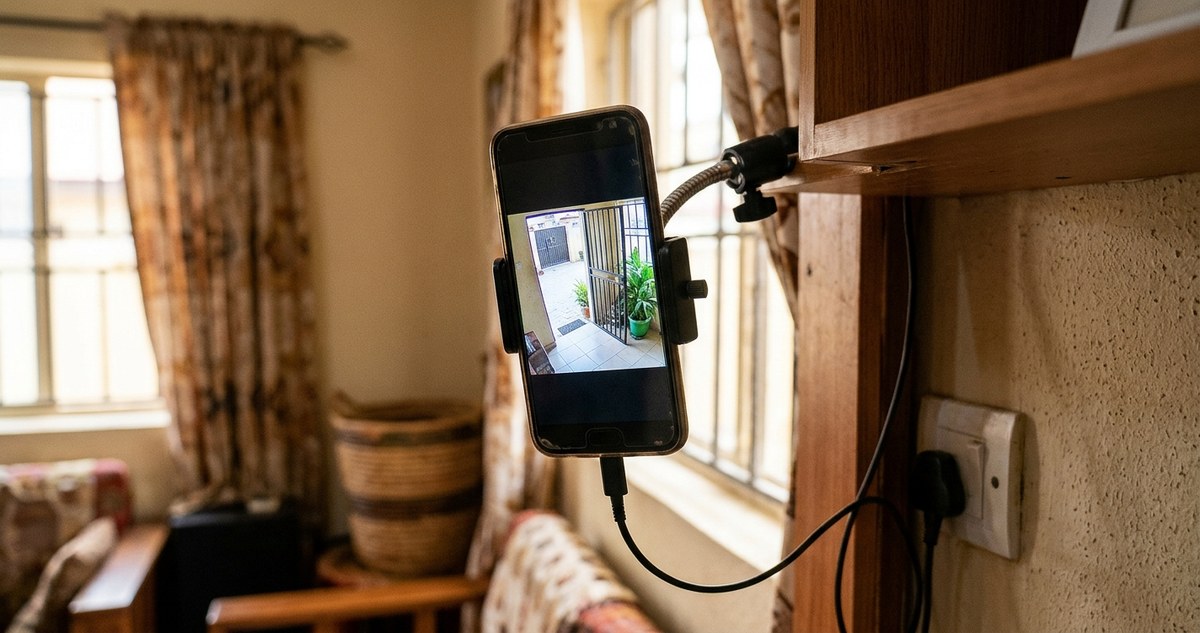
That drawer full of old phones gathering dust could be the smartest security upgrade you make this year. Across Africa, millions of households have at least one unused smartphone sitting idle, often because the screen cracked or the battery stopped holding a full charge. But the camera still works. The Wi-Fi still connects. And with the right app, that forgotten device can watch over your home, your shop, or your compound while you are away. No expensive equipment needed. No monthly subscription fees. Just a few minutes of setup and a little creativity.
You can repurpose any old smartphone with a working camera and a stable Wi-Fi connection into a reliable security camera. This guide covers the best apps, proper placement, power management, and common mistakes to avoid. Whether you live in Lagos, Nairobi, or Cape Town, this DIY solution costs less than a meal out and works with your existing data plan.
Why Your Old Phone Beats a Cheap Security Camera
Commercial security cameras under $50 often have grainy video, poor night vision, and frustrating apps. Your old smartphone, even a model from five years ago, has a better sensor, a faster processor, and a screen for live viewing. Most importantly, it connects to your home Wi-Fi without extra hardware. In many parts of Africa, getting a replacement security camera can mean a long wait for shipping or inflated prices at local electronics shops. You already have the hardware in your hand.
What You Need Before You Start
The checklist is short. You probably own everything already.
- An old smartphone with a functioning camera (Android or iOS)
- A stable Wi-Fi connection at the location you want to monitor
- A charging cable long enough to reach a power outlet
- A mounting solution (a small shelf, a wall hook, or even a stack of books)
- A microSD card or cloud storage account for recording
That is it. No soldering. No wiring. No special tools.
Choosing the Right App for Your Setup
The app you pick determines how well your DIY camera works. Some apps are free but show ads. Others charge a small fee for cloud storage. Below is a comparison of the most reliable options available in Africa in 2026.
| App Name | Platform | Motion Alerts | Night Vision | Cloud Storage | Offline Recording | Best For |
|---|---|---|---|---|---|---|
| AlfredCam | Android & iOS | Yes | Yes | Yes (paid) | No | General home monitoring |
| Manything | Android & iOS | Yes | Yes | Yes (free tier) | No | Multi-camera setups |
| Motion Eye | Android only | Yes | Limited | No | Yes (local SD) | Offline security |
| IP Cam Pro | Android only | Yes | Yes | No | Yes (local SD) | Advanced users |
AlfredCam works well for most people. It sends motion alerts to your current phone, lets you watch live video, and stores clips for up to seven days on the free plan. Manything offers a similar experience but allows you to link multiple old phones into one dashboard. If you live in an area with unreliable internet, Motion Eye records directly to a microSD card and does not need a cloud connection.
Step-by-Step Setup Guide
Follow these steps to turn your old phone into a security camera in under ten minutes.
-
Factory reset the old phone. This removes old logins, slow apps, and clutter. Go to Settings > System > Reset. Skip this step if you already wiped the phone for security reasons.
-
Install your chosen app. Download it from the official app store. Do not sideload apps from unknown sources. Scams targeting security apps are common in Africa.
-
Create an account. Use an email you check regularly. This email will receive motion alerts.
-
Place the phone in the target location. Point the rear camera toward the area you want to watch. For a front door, angle it so it sees the entrance and a few feet of the walkway.
-
Plug in the charger. The phone must stay powered on 24/7. A dead battery means no security. Use the original charger if possible.
-
Test the motion detection. Walk across the frame. Check that you receive an alert on your main phone within a few seconds.
-
Adjust the sensitivity. Too many false alerts from passing cars or swaying trees will drain your patience. Set the sensitivity to medium and lower it if needed.
Where to Mount the Phone for Best Coverage
Placement matters more than the app or the phone model. A camera that sees nothing useful is just a paperweight.
- Front door. Mount the phone at head height, about five feet off the ground. Angle it slightly downward to catch faces clearly.
- Backyard or compound. Place the phone inside a window facing outward. Clean the glass first. Night mode works better without smudges.
- Shop or kiosk. Set the phone on a high shelf behind the counter. This angle covers the register area and the entrance.
- Parking area. Point the camera toward your vehicle. Make sure the phone is protected from direct rain and sun.
Expert advice: Do not hide the phone completely. Thieves often steal visible cameras. A phone that looks like it is just charging on a desk can catch a burglar off guard. Blend it into the room.
Power Management for African Conditions
Electricity reliability varies across the continent. Load shedding in South Africa, generator use in Nigeria, and solar power in rural Kenya all affect how your old phone runs as a camera.
- Enable battery saver mode. Go to Settings > Battery > Battery Saver. This reduces background activity.
- Turn off unnecessary radios. Disable Bluetooth, NFC, and location services. They drain power and add no value.
- Use a smart plug with a timer. If your area has scheduled power cuts, set the phone to charge only during available hours. A power bank can bridge short outages.
- Keep the phone cool. Direct sunlight overheats the battery and can cause swelling. Place the phone in a shaded spot or behind a curtain.
Common Mistakes and How to Avoid Them
Even a simple setup can fail. Watch out for these pitfalls.
- Forgetting about storage. Motion clips fill up space fast. Set the app to overwrite old recordings automatically. Check storage every two weeks.
- Using a weak Wi-Fi signal. A phone in a far corner of the house may lose connection. Use a Wi-Fi extender or move the router closer. Test the signal strength before mounting.
- Ignoring the microphone. Your old phone has a built-in mic. Some apps let you listen in live. Turn off audio recording if you are not comfortable with it, or use it to hear intruders.
- Skipping the password update. The phone may still have your old passwords. Change the Wi-Fi password and the app login. A hacked camera is worse than no camera.
When This Setup Is Not Enough
A smartphone camera works great for basic monitoring, but it has limits. It cannot record in 4K. It cannot pan or tilt. It cannot run on battery for days. If you need those features, consider a dedicated security system. But for most renters and homeowners in Africa, a repurposed phone covers the essential needs: knowing who is at the door, seeing if a package was delivered, and checking on kids after school.
How to Get the Best Trade-In Deal for Your Old Smartphone in Africa
If your old phone is too damaged to use as a camera, you might still get value from it. Many refurbishers and trade-in programs now operate across the continent. Check out our guide on how to get the best trade-in deal for your old smartphone in Africa before you toss it in a drawer.
Turning Your Old Phone Into a Smart Home Hub
A security camera is just one use for an old phone. You can also turn it into a dedicated music player, a digital photo frame, or a smart home controller. For a deeper look at repurposing your device, read how to turn your old smartphone into a smart home hub in Africa.
Protecting Your Privacy While Using a Security Camera
Running a camera in your home means recording your own life. That is fine until someone else gains access. Use a strong password. Enable two-factor authentication on the app. Do not share your camera feed on social media. And if you sell the phone later, factory reset it completely. Your privacy is worth the extra minute.
A Final Word on Keeping Your Setup Running
Your old phone will not last forever. Batteries degrade. Apps stop being supported. But a working setup can give you months or even years of free security. Check on the phone once a month. Wipe the lens. Update the app. Make sure the charger is still snug. A little maintenance goes a long way.
Take that old phone out of the drawer, charge it up, and give it a second life. Your home deserves the protection, and your wallet will thank you.